Monday, November 25, 2013

Pystone - PythonJS vs PyPy


The following Pystone benchmarks were performed with the default 50,000 iterations, the results are the average of five runs. PythonJS is tested in four different modes with greater levels of optimizations. Test machine is: dual core 2.4GHZ, 4GB RAM, LinuxMint with Google-Chrome v31.

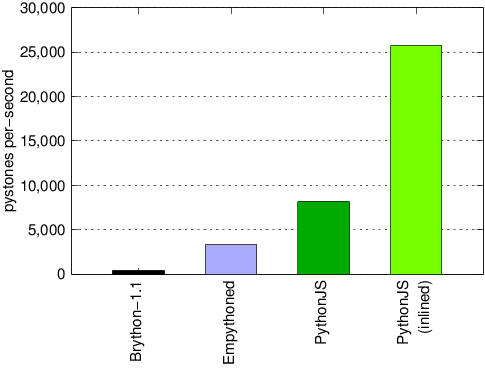
PythonJS vs Brython and Empythoned

Above: Brython, Empythoned, PythonJS in default mode, and PythonJS with inlined optimization. PythonJS outperforms other browser based Python's: Empythoned (3,320 pystones) and Brython (425 pystones). PythonJS in default mode gets 8,150 pystones per-second. See Brython's JavaScript output here

PythonJS vs PyPy

Python2.7 reaches an average of 112,257 Pystones per-second. Pythonium (another Python to JavaScript translator) in its fastest veloce mode reaches an average of pystones 291,480 per-second. PythonJS in javascript mode, reaches an average of 850,120 Pystones per-second. PyPy-1.9 is the winner with an average score of 1,813,461 Pystones per-second.


Brython PythonJS Integration

I am also working on integrating Brython's tokenizer and parser into PythonJS so that PythonJS can be fully self hosted. The file in Brython's source code is py2js.js. It transforms Python code into its own abstract syntax tree that is very similar to the standard Python AST. I am making code to walk this tree and convert it into a standard AST that is required by the translator in PythonJS. See these files, and contact me if you would like to help.

Sunday, November 10, 2013

Brython vs PythonJS


If you have not heard of Brython, it is one of the most popular in-browser Python implementations. From the top of Brython's documentation: "Brython's goal is to replace Javascript with Python, as the scripting language for web browsers." Brython is a long way from reaching this goal, because as we will see below, it has serious performance issues. Brython is slow because of its conformant implementation of the Python standard, which is very dynamic and is generally hard to map to JavaScript.

The following tests compare the performance of Brython 1.1, Python 2.7, PyPy 1.9 and PythonJS 0.8.3. Note that PyPy tests were done with a warmed up JIT. These tests were performed with N=100,000 on a dual core 2.4GHZ machine with 4GB of ram. (test scores below are given in seconds)

Test1 - for loop:

 a = 0
 for x in range( N ):
  a += 1
  • Brython: 6.8249
  • Python: 0.0064
  • PyPy: 0.00267
  • PythonJS: 0.0009

In a simple for loop over a range, with a single variable incremented: Brython is 1,000 times slower than Python, and 7,500 times slower the PythonJS. Lets examine the output of Brython to see why it is so slow.

Brython Output

a=$globals["a"]=Number(0)
var $iter61=iter( range.__call__(N) )
var $no_break61=true;
while(true){
    try{
        x=$globals["x"]=$iter61.__next__()
    }
    catch($err){
      if($err.__name__=="StopIteration"){break}
      else{throw($err)}
    }
    document.$line_info=[21,"__main__"];None;
    $temp=Number(1)
    if(!hasattr(a,"__iadd__")){
        a=$globals["a"]=a.__add__($temp)
    }
    else{
        a=a.__iadd__($temp)
    }
}

As we can see above, Brython generates alot of code for such a simple for loop. Instead of using JavaScript's native number type, Brython has its own Number object. It has a try/catch to catch the StopIteration exception, and also it testing each loop if the number has a method __iadd__, and if not it falls back to using __add__. Lets take a look at how PythonJS translates the same code, and why it is 7,500 times faster in this case.

PythonJS Output

a = 0;
var x;
x = 0;
while(x < N) {
 a += 1
 x += 1
}

The PythonJS compiler knows that a for loop over a range is actually just a simple loop that can be translated to fast JavaScript.

Test2 - while loop:

 a = 0
 i = 0
 while i < N:
  a += 1
  i += 1
  • Brython: 13.5709
  • Python: 0.01008
  • PyPy: 0.00144
  • PythonJS: 0.001

Things get worse for Brython when the loop gets more complicated, this tests increments two values. In this test Brython is 1,300 times slower than Python.

Test3 - calling simple function:

 a = 0
 for x in range(N):
  a += no_args()
  • Brython: 7.717
  • Python: 0.0137
  • PyPy: 0.0025169
  • PythonJS: 0.0019

Test4 - function call with normal arguments:

 a = 0
 for x in range(N):
  a += no_kwargs(1,2,3)
  • Brython: 15.3209
  • Python: 0.0250
  • PyPy: 0.00279
  • PythonJS: 0.3729
  • PythonJS + with fastdef: 0.0039

In this test PythonJS is 14 times slower than Python, this is because by default PythonJS functions that take arguments, have logic to check those arguments at runtime, and to also check if the function was called from JavaScript and if so - adapt the arguments. This can be bypassed using the @fastdef function decorator, or fastdef with statement `with fastdef:`.

In the above test, PythonJS with fastdef is 6.4 times faster than Python. Note that you can still call fastdef function from external JavaScript, you only need to pack arguments into an array as the first argument, and pack keyword args into an Object as the second argument. Example: func( [x,y,z], {a:1, b:2, c:3} )

Test5 - function call with keyword arguments:

 a = 0
 for x in range(N):
  a += call_kwargs(1,2,3, x=1, y=2, z=3)
  • Brython: 14.75
  • Python: 0.0370
  • PyPy: 0.00417
  • PythonJS: 0.631
  • PythonJS + with fastdef: 0.006

Conclusion

Brython is slow and heavy, written almost entirely in JavaScript, and closely follows the Python language standards. Its runtime brython.js is 227KB. Its tokenizer and compiler, py2js.js is 3,500 lines of JavaScript code. It lacks static type analysis and optimizations. Brython is able to translate Python code to JavaScript on the client side. Its performance is much slower than Python.

PythonJS is fast and light weight, written in pure Python, and tries to balance performance concerns with the Python language standards (read more here). Its runtime pythonjs.js is 98KB. The PythonJS translator is 1,900 lines of Python code. The translator includes static type analysis, and optimizes operator overloading and attribute access. It lacks a tokenizer and currently can only translate code on the server side using Python2 as its host. Its performance can surpass Python and approach PyPy in some cases, because it tries to output JavaScript JIT friendly code.

PythonJS 0.8.3 Released

Today I have released PythonJS 0.8.3, this includes the new fastdef and fast for loop optimizations. The performance test above is also included under tests/test_performance.html. The next release of PythonJS will feature integration with NodeJS.
Friday, November 8, 2013

Pixi.js and Blockly Animation System


I am currently working on a way to drive animations in Pixi.js using Tween.js and GoogleBlockly. The new SpriteController Block directly parses the conditional blocks it contains, if the selected Event is True, then the animation will play. In this example the Bee moves left and right when the left and right keys are pressed.

Next I will be working on improving the event system by adding more event types, branching logic, relative animation, and variables.

Wednesday, November 6, 2013

Pixi.js and GoogleBlockly


Pixi.js

Pixi.js is a fast 2D rendering engine that is optimized for WebGL, and is able to use HTML5 Canvas as a fallback. Using WebGL Pixi is able to render high resolution graphics very quickly. The Pixi API is well designed, and easily wrapped in PythonJS, see my bindings here.

Google Blockly Integration

The officially documented way to integrate Google Blockly with an external API is using Blockly.addChangeListener( my_callback ), your callback will be called each time the UI is updated. Your callback can then call Blockly.JavaScript.workspaceToCode() and then use JavaScript's eval to execute the string that it returns. This only allows for weak integration, here are the following problems:

  1. Your callback will be called for every single UI event, like moving blocks, or typing in an input field. This is slow and makes it very hard to catch just the events you are interested in.
  2. You have no way to send signals back to the blocks that generated the code. This makes it impossible to update fields on Blockly's blocks, like number fields. For example, your custom block creates a Sprite, and then in the game the sprite is moved, now your code will need to update the position field on the block in Blockly's workspace, but the Sprite has no reference to the block to do so.
  3. Each time your callback is triggered, you might have to tear down and reinitialize alot of state.
  4. This is generally a bad fit for an Actor model, where entities carry out their own behaviors, and interact with their environment using dynamic rules.

The above problems show us that the official way to integrate Blockly is pretty much useless with a dynamic system that requires bi-directional updates. The workaround to these problems requires us to modify Blockly's prototypes and functions so that blocks can be created from an external API, and UI events can be caught directly for each field. My solution is implemented in the binding layer between Blockly and PythonJS. Blockly's source code can remain intact - because prototypes and functions can be changed at runtime in JavaScript using special syntax in PythonJS. You can see my binding here.

Wrapper Decorators

One of my goals when starting the integration between Google Blockly and Pixi was to write as little wrapper code as possible, but not so little that it was unclear how things are tied together. To achive this I implemented two special class decorators: @pythonjs.init_callbacks and @pythonjs.property_callbacks. These are different from normal Python class decorators because they inject some code and attributes into the class and it's methods at compile time. The "Block Generator" in the Blockly binding can then use the extra attributes to hook in it's own callbacks for when instances of a class are created, and when values are set on property setters. In my first attempts to integrate Blockly with Three.js I had written alot of code to generate a custom block for each Three.js class. The new Block Generator can wrap a class and generate a custom block with a single call: block.bind_class( my_class ).

To run this demo you need the checkout the latest source code for: Pixi.js, GoogleBlockly, and Tween.js. Then pull the latest source for PythonJS. The source code for the demo is here.

Friday, October 25, 2013

Blockly Three.js and Tween.js


Tween.js by Soledad Penades is a fast and simple animation library that can interpolate "tween" values. I have created a binding for Tween.js for PythonJS, here, and integrated it with the GoogleBlockly THREE.js editor, the new animation blocks are efficiently driven by Tween.js and can animate translation and color. see my commit here.

Last night I was chatting with Erik de Bruijn (creator of The UltiMaker 3D printer) and he completely blew me away with his work he has been pioneering with GoogleBlockly and THREE.js to make a constructive solid geometry editor called "UltiShaper". Do not miss these youtubes he has posted!

Tuesday, July 16, 2013

We live in the forest


This is Miran and I. I am coding, while he is training for a fight. Thomas Backlund is another coder living in the forest, but not like Miran and I. No tent, no sleeping bags required - just dig a hole.

Tuesday, July 17, 2012

Google Blockly in Blender

Hacking around with Google Blockly and Blender. Blockly inside of Blender could be useful for game play scripting and other things. At the moment this is just a proof of concept how to get WebKit and Blockly to load inside of Blender and have simple two-way communication.

This hack is standalone, and already includes Blender2.63 compiled by natewiebe13 from Graphicall.org. To get this running, all you need to do is: "sudo apt-get install libwebkitgtk-3.0-dev" download here

Hello World Source Code

import bpy

def myprocedure():
 '''
 user defined function, in blockly just define an empty function,
 and give it the name "myprocedure"
 '''
 bpy.ops.mesh.primitive_monkey_add()


###############################################
import os, sys, time, ctypes

sys.path.append( os.path.abspath('.') )
import webkitgtk as webkit
import Blender # brett's ctypes wrapper to libblender

gtk = glib = webkit # webkit links to gtk and glib
gtk.init()


def get_html():
 dom = view.get_dom_document()
 html = webkit.dom_html_element_get_inner_html( dom )
 return html

def call_javascript( script ):
 '''
 this won't work because it kills newlines!
  view.execute_script('document.title=%s;' %script)
 '''
 view.execute_script(
  "document.getElementsByTagName('text_hack')[0].setAttribute('x',%s);"%script
 )
 result = get_html()
 result = result.split('text_hack x="')[-1]
 result = result.split('"')[0]
 return result

def hack_code( script ):
 '''
 need to hack the script a bit, blockly generates python2,
 and blender needs python3!
 '''
 a = []
 for line in script.splitlines():
  if "print '" in line:
   line = line.replace("print '", "print('") + ')'
  if line == 'null': continue # blockly bug?
  elif line.strip() == 'passnull': # check for an undefined function and remove it
   a.pop()
   continue
  a.append(line)
 script = '\n'.join(a)
 print('----------- python code -------------')
 print(script)
 return script

def execute_python( script ):
 script = hack_code( script )
 print('----------- exec python code -------------')
 exec( script )


################### WebKitGTK ####################
view = webkit.webkit_web_view_new()
print(view)


settings = webkit.web_settings_new()
for prop in 'enable-webaudio enable-file-access-from-file-uris enable-universal-access-from-file-uris enable-developer-extras enable-accelerated-compositing enable-webgl'.split():
 gval = glib.GValue(True)
 glib.g_object_set_property( settings, prop, gval )
view.set_settings( settings )

view.load_uri( 'file://%s/test-blockly.html'%os.path.abspath('.'))


win = gtk.Window()
root = gtk.VBox()
win.add( root )

header = gtk.HBox()
root.pack_start( header, expand=False )


button = gtk.Button('print html')
button.connect('clicked', lambda b: get_html() )
header.pack_start( button, expand=False )

header.pack_start( gtk.Label() )

button = gtk.Button('print python')
button.connect('clicked', lambda b: hack_code(call_javascript("Blockly.Generator.workspaceToCode('Python')")) )
header.pack_start( button, expand=False )

button = gtk.Button('run python')
button.connect('clicked', lambda b: execute_python(call_javascript("Blockly.Generator.workspaceToCode('Python')")) )
header.pack_start( button, expand=False )


root.pack_start( view, expand=True )

win.set_default_size( 800, 600 )
win.show_all()

class BlenderHack(object):
 def update_gtk(self, region):
  while gtk.gtk_events_pending():
   gtk.gtk_main_iteration()


 def setup_blender_hack(self, context):
  self._sync_hack_handles = {} # region : handle
  self.default_blender_screen = context.screen.name
  self.evil_C = Blender.Context( context )

  for area in context.screen.areas:
   if area.type == 'VIEW_3D':
    for reg in area.regions:
     if reg.type == 'WINDOW':
      handle = reg.callback_add( self.update_gtk, (reg,), 'POST_PIXEL' )
      self._sync_hack_handles[ reg ] = handle

  return self._sync_hack_handles

 def mainloop(self):
  self.active = True
  while self.active:
   screen = bpy.data.screens[ self.default_blender_screen ]
   ## force a redraw on the 3d view
   for area in screen.areas:
    if area.type == 'VIEW_3D':
     for reg in area.regions:
      if reg.type == 'WINDOW':
       reg.tag_redraw()
       break
   ## iterate blender's mainloop from ctypes
   Blender.iterate( self.evil_C )
   time.sleep(0.01)


hack = BlenderHack()
hack.setup_blender_hack( bpy.context )
hack.mainloop()
print('exit to normal blender mainloop')

Saturday, June 16, 2012

WebGL - Optimized Streaming


Level of Interest

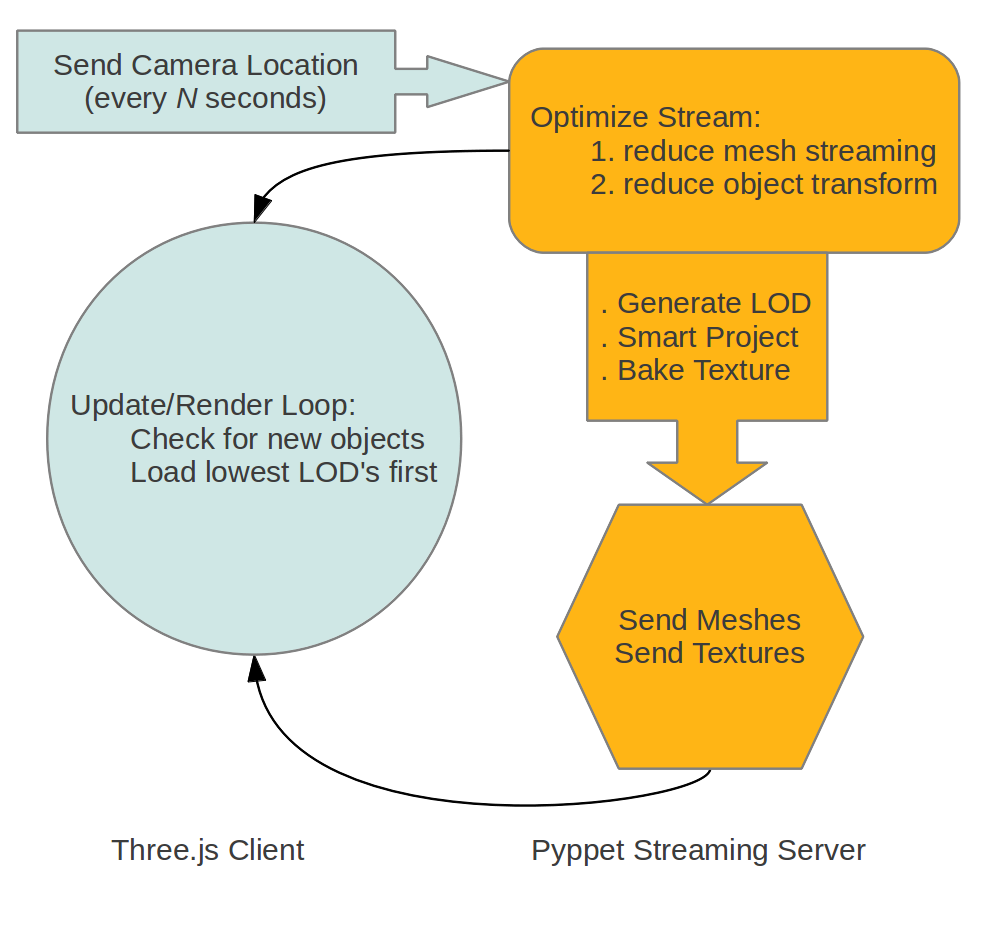
The client sends camera location updates back to the server. The server then optimizes the client stream, first only stream dynamic mesh for objects very near to the camera, and reduce object transform update as an object becomes more distant to the camera.

Level of Detail

To have the scene load as fast as possible for the client, the server streams the lowest level of detail LOD's to the client first, and then slowly sends the higher resolution mesh and textures. LOD's are generated and cached on the fly by the server and could be adaptive to target the clients profile (mobile or desktop).
For each generated LOD the reduction in triangles can be set to any amount, because we do not attempt to preserve UV mapping or sharing materials and textures among LODs - instead we use Blender's decimate modifier to reduce the mesh, uv smart project to generate new UV's, and then generate a new texture using Blender's bake with "selected to active object" using the high resolution mesh as the source of the bake. (baking down to a single material and single texture provides client side performance gains as well, by reducing GPU material/context switching)
Three.js has another feature we can use to improve LOD, subdivision surfaces! This puts no extra bandwidth strain on the server because the subdivision is all done on the client side. Note that in this video the frame rate drops on subdivision because the subdivision is recalculated every frame, this could easily be optimized to only recalculate when crossing the LOD distance threshold.

Streaming Curve Data

Another feature in development is streaming curve data, and later on other types of shapes. This can also greatly reduce server bandwidth because only the control points of the curve need to be streamed, the extrusion to triangles is all done client-side.

Friday, April 27, 2012

Rpython to LLVM - Part2

In the last post we saw that Rpython-to-LLVM can be 200X faster than Python in a tight loop. What happens when the loop gets more complicated? This next test introduces a Vector class, and using a new decorator, the LLVM backend can translate instances of this class into the SSE optimized LLVM vector type.
@rpy.vector( type='float32', length=4 )
class Vector(object):
 def __init__(self, x=.0, y=.0, z=.0):
  self.x = x
  self.y = y
  self.z = z

 def __getitem__(self, index):
  r = .0
  if index == 0: r = self.x
  elif index == 1: r = self.y
  elif index == 2: r = self.z
  return r

 def __setitem__(self, index, value):
  if index == 0: self.x = value
  if index == 1: self.y = value
  if index == 2: self.z = value

 def __add__( self, other ):
  x = self.x + other.x
  y = self.y + other.y
  z = self.z + other.z
  return Vector( x,y,z )

The new decorator is "rpy.vector( type, length )" and for best SSE performance it should be of type float32 with length 4 (even if you only use 3).

Test Function:

def test(x1, y1, z1, x2, y2, z2):
 a = Vector(x1, y1, z1)
 b = Vector(x2, y2, z2)
 i = 0
 c = 0.0
 while i < 16000000:
  v = a + b
  c += v[0] + v[1] + v[2]
  i += 1
 return c

Test Results:

  • Python2 = 51 seconds
  • Rpython-to-LLVM = 0.019 seconds
How could LLVM be 2,680X faster than standard Python? It turns out in this case LLVM is able to optimize the while-loop by moving many operations into the "function entry" and reducing the work the while-loop needs to do (see the optimized LLVM ASM below).

LLVM ASM

define float @test(float %x1_0, float %y1_0, float %z1_0, float %x2_0, float %y2_0, float %z2_0) {
entry:
  %0 = insertelement <4 x float> , float %x1_0, i32 0
  %1 = insertelement <4 x float> %0, float %y1_0, i32 1
  %2 = insertelement <4 x float> %1, float %z1_0, i32 2
  %3 = insertelement <4 x float> , float %x2_0, i32 0
  %4 = insertelement <4 x float> %3, float %y2_0, i32 1
  %5 = insertelement <4 x float> %4, float %z2_0, i32 2
  %vecadd = fadd <4 x float> %2, %5              
  %element = extractelement <4 x float> %vecadd, i32 0 
  %element3 = extractelement <4 x float> %vecadd, i32 1
  %v5 = fadd float %element, %element3           
  %element4 = extractelement <4 x float> %vecadd, i32 2
  %v7 = fadd float %v5, %element4                
  br label %while_loop

while_loop:                                    
  %st_c_0.0 = phi float [ 0.000000e+00, %entry ], [ %v8, %while_loop.while_loop_crit_edge ]
  %st_i_0.0 = phi i32 [ 0, %entry ], [ %v9, %while_loop.while_loop_crit_edge ]
  %v8 = fadd float %st_c_0.0, %v7                
  %v9 = add i32 %st_i_0.0, 1                     
  %v10 = icmp ult i32 %v9, 16000000               
  br i1 %v10, label %while_loop.while_loop_crit_edge, label %else

while_loop.while_loop_crit_edge:                  
  br label %while_loop

else:                                             
  %v8.lcssa = phi float [ %v8, %while_loop ]      
  ret float %v8.lcssa
}

Part2: Escaping the GIL

llvm-py contains an example "call-jit-ctypes.py" that shows you how to bypass the LLVM Execution Engine and instead call your compiled function via ctypes. The advantage of using ctypes over the Execution Engine is that ctypes will release the GIL and allows your Python threads to run in parallel. The next test simply calls the same function four times from four threads at the same time.

Test 4 Threads:

  • LLVM Execution Engine = 0.086 seconds
  • Ctypes = 0.025 seconds
As we can see in this test with 4 threads, ctypes is 3.4X faster on a quad core CPU. Note that another way to escape the GIL is the multiprocessing module, there are pros and cons for both processes and threads. Rpythonic now uses ctypes by default to call the compiled LLVM functions, so its up to you to decide if you want to take advantage of threads or not.

Sunday, April 22, 2012

Rpython to LLVM

Psyco and Unladen Swallow were the first to try to make a just-in-time compiler (JIT) for Python, but these projects have stopped, leaving standard Python with no good JIT solution. So I started investigating how hard would it be to make a JIT for Python using Rpython and LLVM. The results of my first highly experimental implementation of Rpython-to-LLVM show very fast JIT performance: 4x faster than PyPy, 200x faster than Python2, and 260x faster than Python3.

Test Function

def simple_test(a, b):
 c = 0
 while c < 100000*100000:
  c += a + b
 return c
The test function is simply a huge loop that adds-to and returns a 64bit integer. The test was performed on a AMD 2.4ghz Quad with 4GB of RAM, average test result times are:
  • Rpython-to-LLVM = 2 seconds
  • PyPy1.8 (with warm JIT) = 8 seconds
  • Python2.7.2 = 400 seconds
  • Python3.2.2 = 530 seconds

Building The JIT

The first challenge in this project was building the code that traverses the Rpython flow-graph ("flow object space") and converts it into LLVM format. For each Rpython flow-graph block a new LLVM basic-block is created, and for each operation in the block a new LLVM instruction is created. Blocks that loop and modify a variable require some extra work, these mutable variables are treated as stack allocations, and then the LLVM optimization pass PROMOTE_MEMORY_TO_REGISTER replaces the costly stack allocations with fast register memory. It is interesting to see what LLVM IR looks like for the simple function used in this test, before and after the PROMOTE_MEMORY_TO_REGISTER optimization.
Raw LLVM IR
define i64 @simple_test(i64 %a_1, i64 %b_1) {
entry:
  %st_a_1 = alloca i64                            ;  [#uses=2]
  store i64 %a_1, i64* %st_a_1
  %st_b_1 = alloca i64                            ;  [#uses=2]
  store i64 %b_1, i64* %st_b_1
  %st = alloca i64                                ;  [#uses=1]
  store i64 0, i64* %st
  %st_v2 = alloca i64                             ;  [#uses=4]
  store i64 %a_1, i64* %st_v2
  br label %while_loop

while_loop:                                       ; preds = %while_loop, %entry
  %a_0 = load i64* %st_a_1                        ;  [#uses=1]
  %b_0 = load i64* %st_b_1                        ;  [#uses=1]
  %v0 = add i64 %a_0, %b_0                        ;  [#uses=1]
  %v1 = load i64* %st_v2                          ;  [#uses=1]
  %v2 = add i64 %v1, %v0                          ;  [#uses=2]
  store i64 %v2, i64* %st_v2
  %v3 = icmp ult i64 %v2, 10000000000             ;  [#uses=1]
  br i1 %v3, label %while_loop, label %else_return

else_return:                                      ; preds = %while_loop
  %0 = load i64* %st_v2                           ;  [#uses=1]
  ret i64 %0
}
LLVM IR (after PROMOTE_MEMORY_TO_REGISTER)
define i64 @simple_test(i64 %a_1, i64 %b_1) {
entry:
  br label %while_loop

while_loop:                                       ; preds = %while_loop, %entry
  %st_v2.0 = phi i64 [ %a_1, %entry ], [ %v2, %while_loop ] ;  [#uses=1]
  %v0 = add i64 %a_1, %b_1                        ;  [#uses=1]
  %v2 = add i64 %st_v2.0, %v0                     ;  [#uses=3]
  %v3 = icmp ult i64 %v2, 10000000000             ;  [#uses=1]
  br i1 %v3, label %while_loop, label %else_return

else_return:                                      ; preds = %while_loop
  ret i64 %v2
}

LLVM Advantages

LLVM is more than just a JIT, because LLVM IR is platform independent, it becomes the best solution for making Python extension modules that need to support all platforms and all Python versions. A classic Python extension module is written in C, and must be compiled for each Python version, each OS, and each OS type (32bit and 64bits)! (Python2+Python3+PyPy)*(Linux+OSX+Windows)*(32bits+64bits) = 18 targets. How is anybody supposed to compile their Python extension for all 18 targets? LLVM IR can be generated on any platform any bit-depth, saved to a file, and later loaded and run on any target that PyLLVM supports. PyLLVM works with Python2 and Python3; and is easily portable to PyPy using cpyext. In other words, LLVM IR can easily hit all 18 targets - no problem.
Extra Advantages:

  • LLVM easily calls into C libraries
  • LLVM has a SIMD accelerated vector type
  • LLVM has powerful optimizations like: PROMOTE_MEMORY_TO_REGISTER
  • Rpython and LLVM are a natural fit
Still not convinced? Read what Intel has to say about LLVM.

source code

requires Mahadevan's PyLLVM

Wednesday, February 1, 2012

Progressive Baking


Texture maps are progressively downloaded from the Blender integrated server. Baking happens on demand and is fully automated. Client side javascript code adapts the texture request to best fit the given shader. Supported texture layers: diffuse, AO, specular intensity and displacement.

Hardware Displacement Mapping


The base mesh (without subdivision) is sent to the client. The client then applies subdivision and recalculates the tangents. The displacement map is progressively downloaded starting at 64x64 and stopping at 512x512 resolution. The displacement happens in hardware using GLSL shader model 3.0. Code recycled from the Three.js examples.

Tuesday, January 24, 2012

Pyppet - WebGL Streaming


Check out Three.js on github and get ready to be blown away, so much power in 380KB.

Websockets Streaming Mesh - WebGL Client


Websockify by Joel Martin has got everything you need to get websockets going in Python3.

Supported Streaming Modifiers


  • Cast,
  • Curve,
  • Displace,
  • Hook,
  • Lattice,
  • MeshDeform,
  • ShrinkWrap,
  • SimpleDeform,
  • Smooth,
  • Warp,
  • Wave


Streaming the default blender monkey head (500 vertices) to the web-client creates a load of about 350KB per-second. This is still using ASCII Json for transport, so hopefully in the future a binary stream or other packing method could cut this down even more.

Thursday, January 5, 2012

Pyppet2 - Audio Analysis


Prototype for real-time musical performance at live events, concerts. TODO: OSC integration to support pro music hardware, sample mixer integrated with physics system (collisions trigger sounds), particles, multiple full screen windows and camera switching driver input.

Blenderartists thread

pyppet 1.9.3b source code

Update


linux install guide
feature requests approved:


  • "assign multiple movement and rotation controls to one OSC input"

  • "adjust scale, and attack/release function" (callbacks)